Record Portrait & Landscapein one take.
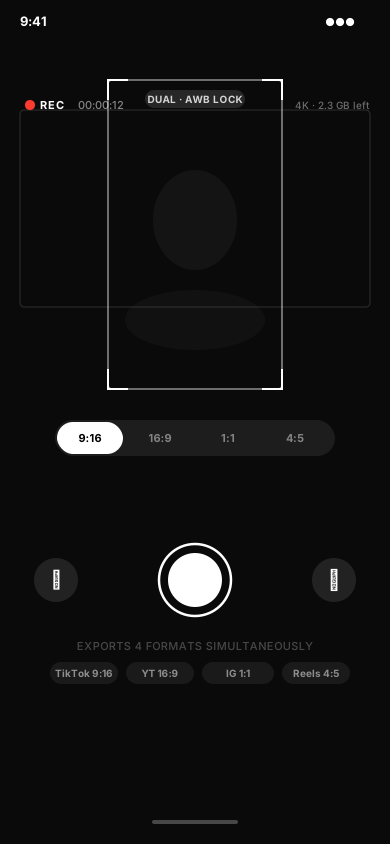
Hit record once. Get a 9:16 clip for TikTok and a 16:9 clip for YouTube — both color-matched, saved straight to your camera roll.


You film everything twice. You shouldn't.
TikTok wants vertical. YouTube wants horizontal. So you film the same thing twice, upload twice, and post twice — every single time. OmniCam records both at once, from two lenses, in one tap. Film once. Post everywhere.
YouTubeInstagramFacebookThree modes.One app. Zero compromise.
Dual mode for portrait + landscape. Split mode for reactions.Single mode when simple is all you need.
Dual Mode
One tap records both vertical (9:16) and horizontal (16:9) at the same time.
Colors That Match
Both clips always look the same. No color fixing after. Just hit record.
Saved Crop Presets
Set your frame once for TikTok, YouTube, Instagram. It's still there next time you open the app.
4K on Every Clip
Both clips export in full 4K. Looks great on any screen, any platform.
Full-Size Preview
See exactly how you'll look before you record. No surprises.
Any Lens Combo
Wide, telephoto, ultra-wide, front — pick any two lenses. Your shot, your way.
MP4 or MOV — Your Choice
Export in MP4 for easy sharing or MOV for editing. Switch anytime.
H.264, HEVC & Apple ProRes
Pick the codec that fits. H.264 for small files, HEVC for quality, ProRes for pro editing. Bitrate control included.
Built-in Teleprompter
Your script on screen while you record. Set the speed, set the size, just talk.
Tap to Focus. Lock It.
Tap anywhere to set your focus and exposure. Lock them so nothing shifts mid-take.
Zoom While You Record
Pinch to zoom during a live take. Smooth and precise — no cuts needed.
Pause Mid-Take
Pause, reframe, keep going. Everything saves as one clean clip.
Open. Record. Post.That's the whole thing.
01
Pick Your Mode
Dual, Split, or Single. Your last settings are already saved. Just pick and go.
02
Hit Record Once
One tap. Both cameras start at the same time. Colors match automatically. You just talk.
03
Post Everywhere
Two clips land in your camera roll. One for TikTok. One for YouTube. Done.


The only dual-camera appwith matched colors.
Other apps give you two clips that look like they came from different phones. OmniCam gives you footage that actually matches.
Creators love it.
“I used to film every video twice — once vertical, once horizontal. OmniCam lets me do both in one take. My posting schedule finally makes sense.”
Sarah K.
“The color matching is what sold me. My TikTok and YouTube clips look like they came from the same shoot because they literally did. No more fixing in post.”
Marcus T.
“Split mode is a lifesaver for reaction content. Front camera on me, back camera on the screen. One file. Done.”
Priya N.
“I used to film every video twice — once vertical, once horizontal. OmniCam lets me do both in one take. My posting schedule finally makes sense.”
Sarah K.
“The color matching is what sold me. My TikTok and YouTube clips look like they came from the same shoot because they literally did. No more fixing in post.”
Marcus T.
“Split mode is a lifesaver for reaction content. Front camera on me, back camera on the screen. One file. Done.”
Priya N.
“I used to film every video twice — once vertical, once horizontal. OmniCam lets me do both in one take. My posting schedule finally makes sense.”
Sarah K.
“The color matching is what sold me. My TikTok and YouTube clips look like they came from the same shoot because they literally did. No more fixing in post.”
Marcus T.
“Split mode is a lifesaver for reaction content. Front camera on me, back camera on the screen. One file. Done.”
Priya N.
“No account. No subscription. No nonsense. Opens, records, saves to my Photos. That's all I wanted and that's exactly what it does.”
Jordan L.
“I was juggling three apps for different formats. OmniCam replaced all of them. $4.99 once and I'm done.”
Alex R.
“The saved crop presets are underrated. My frames are exactly where I set them every time I open the app. Other apps make me re-crop every shoot.”
Destiny M.
“No account. No subscription. No nonsense. Opens, records, saves to my Photos. That's all I wanted and that's exactly what it does.”
Jordan L.
“I was juggling three apps for different formats. OmniCam replaced all of them. $4.99 once and I'm done.”
Alex R.
“The saved crop presets are underrated. My frames are exactly where I set them every time I open the app. Other apps make me re-crop every shoot.”
Destiny M.
“No account. No subscription. No nonsense. Opens, records, saves to my Photos. That's all I wanted and that's exactly what it does.”
Jordan L.
“I was juggling three apps for different formats. OmniCam replaced all of them. $4.99 once and I'm done.”
Alex R.
“The saved crop presets are underrated. My frames are exactly where I set them every time I open the app. Other apps make me re-crop every shoot.”
Destiny M.
Try everything free.Own it forever.
Pay once. No subscription. Ever.
Free
forever
All cameras. No payment. No catch.
- Dual camera — portrait + landscape
- 1080p at 30fps
- H.264 codec
- MOV export
- Color-matched output
- Any lens combination
- Tap-to-focus & exposure lock
- Zoom while recording
- Pause & resume
- Front camera support
- Saves to your camera roll
- No account needed
- Flashlight control
- 7-day Pro trial included
Pro
one-time · no subscription
Every mode. Every feature. Once.
- Everything in Free
- All 3 modes — Dual, Split, Single
- 4K at any frame rate
- Any lens combination
- Saved crop presets
- Color-matched exports
- Full-size front camera preview
- MP4 & MOV export
- H.264, HEVC & Apple ProRes
- Built-in teleprompter
- Tap-to-focus & exposure lock
- Zoom while recording
- Pause & resume
- Family Sharing — buy once, everyone gets it